Table of Contents
- Why Natural Light Works So Well
- The Best Time of Day for Selfies
- How to Use Window Light
- Outdoor Selfies: Shade, Sun, and Clouds
- Camera Angle and Distance
- Phone Settings That Help
- Backgrounds and Small Details
- Light Editing Without Overdoing It
- Common Selfie Mistakes
- Privacy and Safety When Sharing
- FAQs
- Conclusion
A great selfie usually has less to do with an expensive phone and more to do with where the light is coming from. Soft, natural light makes skin look smooth and eyes look bright, while bad lighting can make even a lovely photo look flat or harsh.
This guide shows you how to take the perfect selfie in natural light using only your phone and the light around you.
Why Natural Light Works So Well
Natural light is free, gentle, and flattering when used well. Compared with a room’s yellow bulb or a harsh flash, it generally gives:
- Softer shadows on the face
- More natural skin tones
- Brighter eyes with a small, natural highlight
- Less grain, because your phone doesn’t have to boost its sensitivity as much
The goal isn’t to find “more” light. It’s to find soft light and place yourself in the right spot.
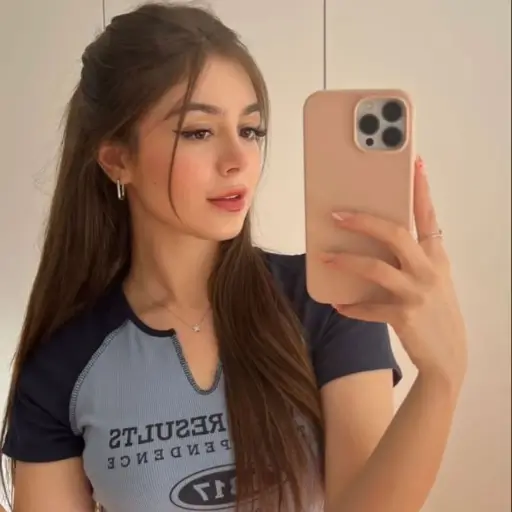
The Best Time of Day for Selfies
Light changes through the day, and that changes how you look.
| Time of Day | Light Quality | Selfie Tip |
|---|---|---|
| Early morning | Soft and gentle | Great for fresh, natural looks |
| Mid-morning | Bright and fairly even | Good near a window or in open shade |
| Midday | Strong, harsh, from above | Avoid direct sun, as it creates shadows under the eyes and nose |
| Late afternoon | Warm and softer | Flattering for most skin tones |
| Golden hour (shortly before sunset) | Warm, soft, glowing | Often the favourite time for portraits |
| Cloudy day | Even and diffused | Works like a giant soft light all day |
Exact timing depends on your location and the season, so try a few different times and see what you like best.
How to Use Window Light
Indoors, a window is one of the easiest ways to get beautiful light.
- Face the window. Stand or sit so the light falls on your face. This lights up your features evenly.
- Stand a little away from the glass, not pressed against it. A step or two back often looks softer.
- Use a thin curtain. A sheer curtain spreads direct sun into softer light.
- Turn off other lights. Mixing yellow indoor bulbs with daylight can make your skin look uneven in colour.
- Check the angle. If the light comes from slightly to one side, it adds a little shape to your face. Straight on gives an even, soft look.
Tip: Avoid standing with your back to the window. Your phone will try to expose for the bright background, and your face will turn dark.
Outdoor Selfies: Shade, Sun, and Clouds
Open Shade
Standing in the shade of a building or tree, but still facing open sky, gives very even light. It’s often more flattering than standing in direct sun.
Direct Sun
Direct sun can make you squint and create strong shadows. If you shoot in it, try turning slightly so the sun is at an angle and not straight above or directly in your eyes.
Cloudy Weather
Overcast skies act like a soft diffuser. Skin tends to look smooth, and colours look natural, so don’t skip selfies on grey days.
Golden Hour
Light before sunset is warm and low. Face the light gently, and keep your eyes relaxed so you don’t squint.
Camera Angle and Distance
Light matters most, but angle also changes how a selfie looks.
- Hold the phone at eye level or slightly above. Very low angles can be unflattering.
- Don’t hold it too close. Very close shots can distort your features. Extending your arm a little, or using a timer with the phone propped up, helps.
- Tilt your chin slightly, not too high and not too low.
- Relax your shoulders and face. A natural smile looks better than a stiff pose.
- Try different sides. Most people have a side they like a little more.
- Use a timer or a small stand for hands-free shots with a more natural pose.
Phone Settings That Help
A few simple habits make a big difference:
- Clean your lens. Fingerprints cause hazy, soft-looking photos. Wipe it gently with a soft cloth.
- Tap to focus on your face, and adjust exposure if your phone allows it (usually by sliding up or down after tapping).
- Turn on grid lines to keep your framing straight.
- Use HDR if your phone offers it, especially in bright light.
- Avoid heavy digital zoom. It lowers quality.
- Try Portrait mode for a softly blurred background, if your phone supports it.
- Check your front camera’s beauty or filter settings. Heavy smoothing can look artificial, so consider keeping it low or off.
- Take several shots. Burst mode or a few quick frames give you more options.
Settings and names differ by phone, so explore your camera app. If you want to understand more about how phone cameras work, apkmunna has simple guides on camera specs and what actually matters in photo quality.
Backgrounds and Small Details
A great selfie also depends on what’s behind you.
- Keep the background simple. Clutter distracts from your face.
- Check for bright spots such as lamps or windows directly behind your head.
- Look for soft, neutral backdrops, like a plain wall, curtains, or greenery.
- Watch for objects “growing” out of your head, like a pole or plant behind you.
- Make sure your hair and clothes look neat before you start.
A quick glance at the whole frame before you press the button saves a lot of retaking.
Light Editing Without Overdoing It
Editing can polish a photo, but small adjustments usually look best.
- Brightness and exposure: Slightly lift if the image is dark.
- Contrast: Add a tiny amount for depth.
- Warmth: Adjust a little if the colours look too cool or too yellow.
- Crop: Straighten the frame and remove distractions.
- Skin smoothing: Use very lightly, if at all, since heavy retouching can look unnatural and hides your real features.
If your photo is great in natural light, you may not need much editing at all.
Common Selfie Mistakes
- Shooting in harsh midday sun
- Standing with a bright window behind you
- Mixing yellow indoor lights with daylight
- Using the flash, which can flatten your face and create glare
- Holding the phone too low
- Forgetting to clean the lens
- Over-filtering or over-smoothing
- Ignoring the background
- Squinting into the sun
- Taking only one shot instead of several
Privacy and Safety When Sharing
A little care helps protect you, especially when posting online.
- Check your background. Avoid showing your house number, ID, school or office name, or documents.
- Turn off location tagging on photos if you don’t want others to know where you are. You can usually find this in your phone’s camera or privacy settings.
- Be careful about sharing in real time. Posting later is safer than showing your exact location live.
- Control who can see your photos. Use privacy settings on social platforms.
- Never send private photos to people you don’t know well. Fake profiles and online scams are real, and apkmunna also covers how to spot them.
- Report and block anyone who harasses you.
Frequently Asked Questions
What is the best light for a selfie?
Soft, diffused natural light, such as window light, open shade, or a bright cloudy day, is generally the most flattering.
What time of day is best for natural light selfies?
Early morning and late afternoon, including golden hour, usually give soft, warm light. Midday sun is usually harsher.
Should I face the light or stand with my back to it?
Face the light so your face is evenly lit. Having a bright light behind you often makes your face look dark.
Is a window enough for a good selfie?
Yes. A window with soft daylight and a simple background can give excellent results.
How can I avoid squinting in sunlight?
Move into open shade, turn slightly away from direct sun, or take the photo on a cloudy day.
Do I need an expensive phone?
No. Lighting, angle, and a clean lens matter much more than the phone’s price.
Should I use flash for selfies?
It’s usually better to avoid it. Flash can create harsh glare and flat-looking skin. Natural light is gentler.
How many photos should I take?
Take several. Small changes in expression, angle, and light can make a noticeable difference.
Conclusion
To take the perfect selfie in natural light, focus on three things: find soft light, face it, and keep your angle and background simple. Window light, open shade, golden hour, and cloudy days are all easy options that cost nothing. Add a clean lens, a relaxed expression, and a few extra shots, and you’ll get a natural, flattering photo.
Don’t aim for perfection. Aim for a photo that looks like you on a good day. And when you share it, take a moment to protect your privacy. For more practical guides on phones and everyday life, apkmunna is a helpful place to keep exploring.