How Does an LCD Screen Work?
From smartphones and laptops to TVs and digital watches, LCD screens are everywhere, quietly displaying everything from text messages to full-motion video. Despite being one of the most common display technologies in daily life, most people have never really stopped to wonder how a thin, flat panel manages to produce sharp, colorful images using nothing but light and some clever engineering.
Let’s break down exactly what’s happening inside an LCD screen, layer by layer, and why this technology became so widely used across so many different devices.
What LCD Actually Stands For
LCD stands for Liquid Crystal Display, and the name itself hints at the core technology involved: liquid crystals, a unique state of matter that behaves like a liquid in some ways while still maintaining certain structural properties similar to a solid crystal.
Importantly, liquid crystals themselves don’t produce any light on their own. Instead, an LCD screen relies on a separate light source and uses liquid crystals to control and shape that light into the images you actually see.
The Basic Layers Inside an LCD Screen
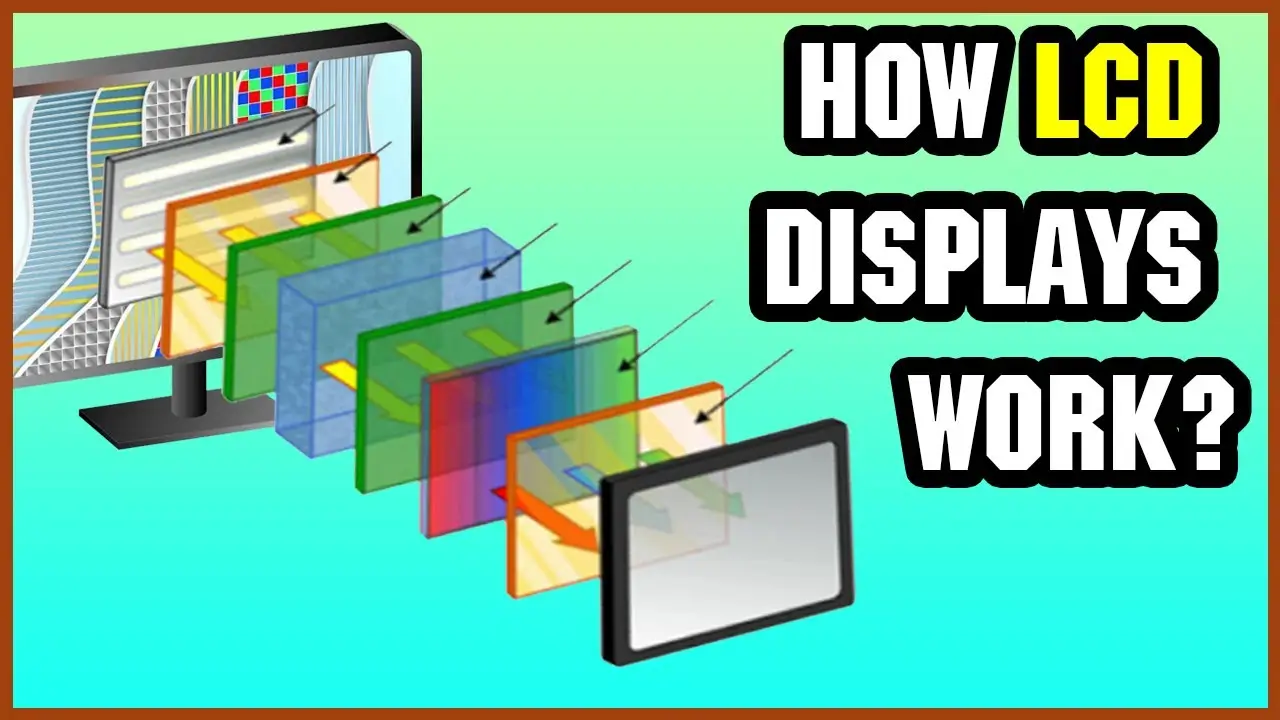
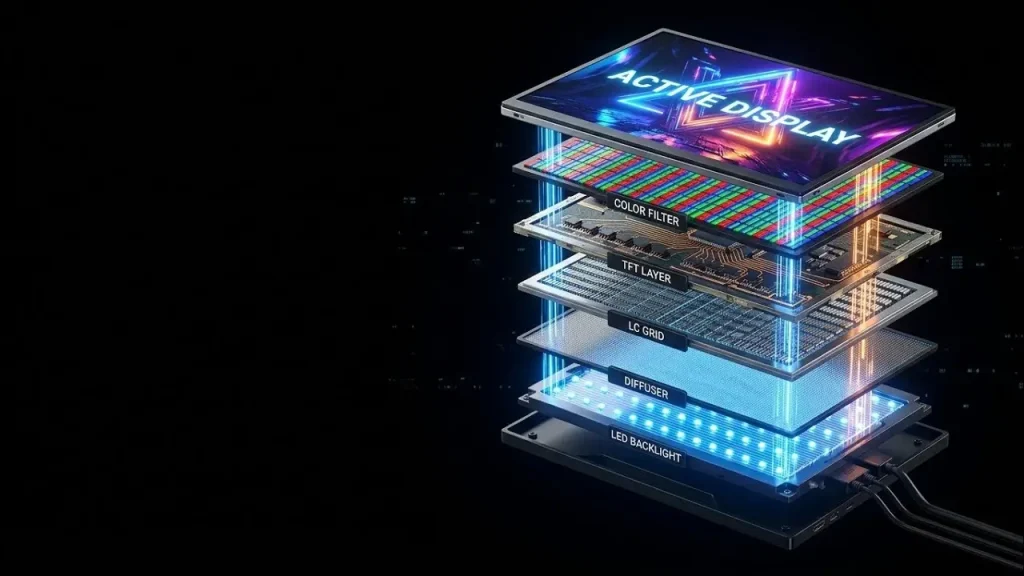
An LCD panel is built from several thin layers stacked together, each playing a specific role in the overall process:
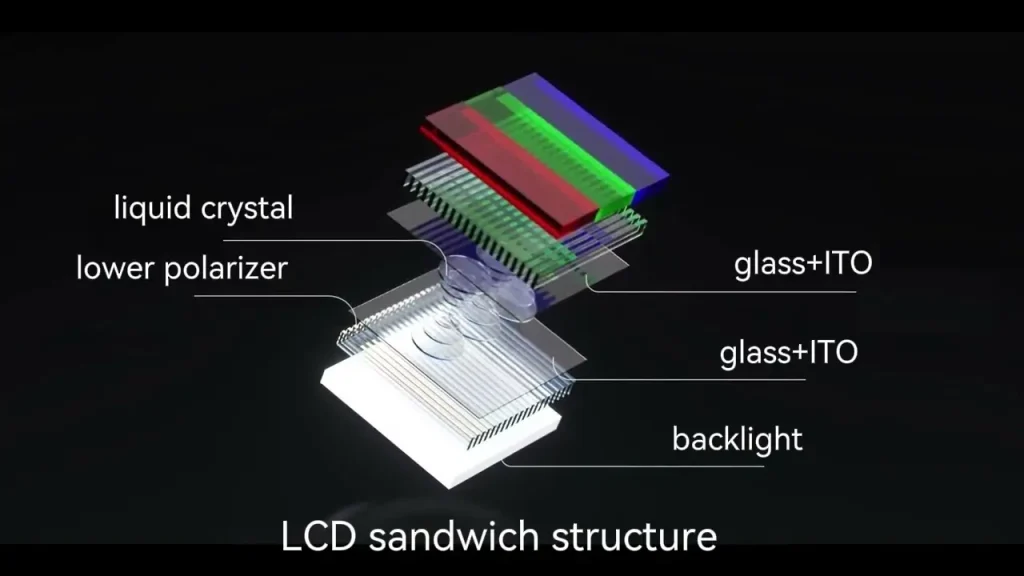
- Backlight: A light source, usually LED-based in modern screens, positioned behind the entire display panel
- Polarizing filters: Two filters, positioned at specific angles, that control which direction light waves are allowed to pass through
- Liquid crystal layer: The core component that twists or untwists to control how light passes through
- Color filters: A layer containing tiny red, green, and blue subpixel filters that create the actual colors you see
- Glass substrate and electrodes: Thin layers containing the electrical circuitry needed to control each individual pixel
How Light Actually Travels Through an LCD Screen
Step 1: The Backlight Produces Light
Since liquid crystals can’t generate their own light, an LED backlight sits behind the entire screen, providing a constant, even source of white light.
Step 2: Light Passes Through the First Polarizing Filter
Light naturally travels in multiple directions and orientations. The first polarizing filter only allows light waves aligned in one specific direction to pass through, blocking the rest.
Step 3: Liquid Crystals Control the Light’s Path
This is where the “liquid crystal” part of LCD does its actual work. Depending on the electrical voltage applied to a specific section of the liquid crystal layer, the crystals twist into different orientations, which either allows light to continue passing through in its current alignment or rotates the light’s orientation.
Step 4: The Second Polarizing Filter Acts as a Gate
A second polarizing filter, positioned at a different angle from the first, only allows light through if it’s been rotated into the correct alignment by the liquid crystal layer. This means the liquid crystals essentially act as a controllable gate, deciding how much light gets through to the next layer, pixel by pixel.
Step 5: Color Filters Create the Actual Colors
Once light makes it through both polarizing filters, it passes through tiny red, green, and blue color filters, corresponding to individual subpixels. By controlling the exact intensity of light allowed through each of these three subpixel colors, the screen can create millions of different color combinations for every single pixel.
Step 6: The Final Image Forms
With millions of individual pixels each displaying a precisely controlled color and brightness, the combined result forms the complete image or video you see on the screen.
Why Liquid Crystals Are Useful for This Process
Liquid crystals have a genuinely useful property: their molecular structure can be manipulated using electrical voltage, allowing precise, individual control over tiny sections of the display. Without voltage applied, the crystals sit in one orientation; when voltage is applied, they twist into a different orientation, changing exactly how much light passes through at that specific point.
This ability to be electrically controlled at an extremely small, precise scale is what allows LCD screens to render detailed, high-resolution images with millions of individually adjustable pixels.
LCD vs. Other Common Display Technologies
| Display Type | Light Source | Key Characteristic |
|---|---|---|
| LCD | Separate backlight (usually LED) | Requires backlight; can’t achieve true black without extra techniques |
| OLED | Each pixel emits its own light | True blacks possible since pixels can turn off individually |
| LED (often just an LCD variant) | LED backlight specifically | Refers to the backlight type, not a fundamentally different display technology |
It’s worth noting that many screens marketed simply as “LED TVs” or “LED monitors” are actually LCD screens using an LED backlight specifically, rather than being a completely separate display technology from LCD itself.
Why LCD Screens Sometimes Struggle With True Black
Since LCD screens rely on a separate backlight that’s always at least partially active, even when a pixel is instructed to display black, some light can still leak through, since liquid crystals can block most, but not always 100%, of the light passing through them. This is why LCD screens sometimes show a slightly grayish tint in dark scenes, compared to technologies like OLED, where individual pixels can turn off entirely to produce a true, complete black.
Manufacturers have developed techniques like local dimming, where specific sections of the backlight can be dimmed independently based on the content being displayed, to help reduce this effect, though it doesn’t fully eliminate it the way pixel-level control does on other display types.
Why LCD Technology Became So Widely Used
Energy Efficiency
Compared to older display technologies like CRT (cathode ray tube) screens, LCDs consume significantly less power, making them well-suited for battery-powered devices like laptops and smartphones.
Thin, Lightweight Design
LCD’s flat panel design allows for much thinner, lighter devices compared to the bulky, deep displays required by older technologies.
Cost-Effective Manufacturing
Over time, LCD manufacturing processes have become highly refined and cost-efficient at scale, making the technology widely accessible across a huge range of budget and premium devices alike.
Good Overall Image Quality
While newer technologies like OLED offer certain advantages, modern LCD screens, especially higher-end variants, still provide strong brightness, color accuracy, and reliability for most everyday viewing needs.
If you’re comparing display technologies before buying a new TV or monitor, apkmunna has a dedicated breakdown comparing LCD, LED, and OLED options to help you understand which matters most for your specific use case.
Common LCD Variants You Might See Advertised
- TN (Twisted Nematic): An older, cost-effective LCD type known for fast response times but weaker color accuracy and viewing angles
- IPS (In-Plane Switching): Offers significantly better color accuracy and wider viewing angles, commonly used in higher-quality monitors and smartphones
- VA (Vertical Alignment): Often provides deeper contrast and better black levels compared to TN or standard IPS panels, though sometimes with slower response times
Each variant essentially uses the same core LCD principles described above, but arranges the liquid crystal layer differently to prioritize different performance characteristics.
Frequently Asked Questions
Do LCD screens work without a backlight?
No. Since liquid crystals don’t produce their own light, an LCD screen requires a separate backlight to function; without it, the screen would appear completely dark regardless of what’s being displayed.
Is “LED TV” a completely different technology from LCD?
No. Most LED TVs are actually LCD screens that specifically use LED backlighting, rather than being a fundamentally separate display technology altogether.
Why do LCD screens sometimes look different depending on the viewing angle?
This varies by panel type. TN panels, in particular, tend to show noticeable color shifts at wider viewing angles, while IPS panels are specifically designed to minimize this issue.
Are LCD screens still relevant compared to OLED?
Yes. LCD remains widely used, especially in budget-to-midrange devices, due to its cost-effectiveness and generally strong overall performance, even though OLED offers certain advantages like true blacks and thinner designs in premium devices.
Why do LCD monitors sometimes have dead or stuck pixels?
This can happen due to manufacturing imperfections at the individual pixel level, where a specific liquid crystal cell fails to respond correctly to electrical signals, either staying permanently on, off, or stuck displaying a specific color.
Conclusion
An LCD screen works by using a backlight, polarizing filters, and a layer of electrically controlled liquid crystals to precisely manage how light passes through millions of individual pixels, ultimately forming the sharp, colorful images we see every day. While newer technologies continue to emerge, LCD’s efficient, cost-effective design has kept it a relevant and widely used display technology across countless devices.
Understanding this layered process also helps explain some of LCD’s practical quirks, like imperfect black levels or viewing angle differences between panel types. For more clear, practical breakdowns of the everyday technology shaping the devices you use, apkmunna remains a great resource to keep exploring.